Saturday, April 03, 2010

Canigao Island, Matalom, Leyte

Here's how to get to Canigao Island, Matalom, Leyte:

From Cebu (by boat):

Via Bato:
9PM or 8PM nightly, Pier 3
Boats: South Pacific, Fiji II, Our Lady of Guadalupe*, Our Lady of Angel*
ETA Bato: 3:30-4:30 A.M.
*-RORO boats
Via Hilongos:
9PM or 10PM nightly, Pier 3
Note: There are also day trips.
1:30 PM - Kinswell (small fast craft), ETA Hilongos- 4:30P.M.

Sunday, March 21, 2010

Limasawa Island, Southern Leyte

short list of what you can find in Limasawa: beaches at Padre Burgos, dive spots at San Francisco in Napantao and Padre Burgos where you can find pawikans and pilot whales, Cambaro cave complex, Mainit hot springs, Mountain climbing and more! done some research and found out how to get from Cebu City to Limasawa Island in Southern Leyte..

Saturday, May 09, 2009

Samsung 2333HD LCD TV Part 4 FX5200

some photos i took while playing 1080p videos using my old desktop via vga d-sub cable. sorry i have no dvi or hdmi out.

specs:
2.66 GHz P4
ASUS P4PE socket 478, AGP @4x only
768MB RAM
Palit GeForce FX5200 128MB AGP 8x 128bit

Star Trek trailer 1080p

2333HD fx5200 star trek
notice the jagged lines? even after updating to the latest nvidia 175.19 driver for fx5200 still gave the same result. turns out that fx5200 doesn't support 1080p resolution videos although my winxp desktop looks good at 1920x1080 @60Hz. even my 720p avi videos has barely noticeable jagged lines.

after 2 days of tweaking and reinstalling drivers, codecs, players i finally gave up playing videos at 1080 and change resolution to 720.

some more photos:

2333HD fx5200 star trek

Samsung 2333HD LCD TV Part 3 Hidden Menu

as promised here are some 2333HD hidden menu photos

main menu after pressing mute + 1 + 8 + 2 + power

2333HD Hidden Menu - Main

EPA Standard menu window

2333HD Hidden Menu - EPA Standard

Thursday, May 07, 2009

Samsung 2333HD LCD TV Part 2 Hidden Menu

to get to your 2333HD Hidden Menu, make sure your monitor is turned off then using the remote controller key in Mute -> 1 -> 8 -> 2 -> Power.

this is shown at the main menu of my first 2333HD:

T-C23AUSC-1000.0
mvd_HD.bin: 0184
LIB_CC_J.LIB: 005062
LIB_ATSC_J.LIB: 0023
LIB_Demux_ATSC_J.LIB: 0017
LIB_Demux_lsr_J.LIB: 0008
demux_atsc_bin: 0017
Aug 26 2008
PANEL: 23A

at the back panel of the monitor the manufacturing date is November 2008. i returned this unit because of a defective remote IR receiver.

if any of you guys can discern what the text means please leave a comment.

Samsung 2333HD LCD TV

90 days without a post? sorry bout that guys. just moved in to a new apartment :)

anyways, now that we have more space we decided to buy a TV!

my first choice was the Samsung 32" Series 5 LA-32A550 Full HD 1080p that sells for PHP49,900.00 at SM appliance. they'd take of 5,000.00 if you buy it cash.

Video
Screen Size: 32"
Resolution: 1920 x 1080
Dynamic Contrast Ratio: 35,000:1
Viewing angle: 178°/178° (H / V)
Response Time: 5 ms
DNIe™: DNIe+

Audio
Sound Output(RMS): 10W x 2
Feature Picture-in-Picture: 1 Tuner PIP
Anynet+ (HDMI-CEC): Yes

then i found out after googling for reviews, in Manila you can get it for 36500.00 only!! even if i shell out 3000.00 for shipment (approximate) that deal is still bang for the buck.

i can't wait for the stocks to come in, the 32" are very hard to get now. so i looked for other options.

i checked the specs of lcd tvs in the samsung site and found the 2333HD. it's more of a monitor than tv and sells for 15000.00 ~ 16000.00 at computer shops. got it at 15900.00 CASH.

Display
Screen Size: 23" Wide
Resolution: 1920 x 1080
Brightness: 300cd/㎡
Contrast Ratio: DC 10,000:1(Typ. 1,000:1)
Response time: 5ms
Viewing Angle(Horizontal/Vertical): 160˚/160˚ (CR>10)

Features
Plug & Play: DDC2B
Multimedia Speakers: 3W x 2ch
Special Features: Built-in HDTV(ATSC) Tuner, Dolby Digital Sound, Optical digital sound (SPDIF), Component, 2 HDMI, Full HD
USB powered hub option: No
Mac compatibility: Yes

now a word of advice: check your lcd tv thoroughly before buying. test for dead pixels, try playing 1080p videos, and since this is a tv check the remote control functions!!

first unit we got has a manufacturing date of November 2008. some were lucky to have a functioning remote but i wasn't one of them. my remote can only be used < 2ft straight angle. now who would produce a tv with < 2ft range? samsung? i doubt it. so i returned my unit to the store and after almost a week of waiting we were given a unit manufactured on January 2009. remote works well even at > 20ft at any angle.

another plus is that samsung has an ongoing promotion. register your unit at their site and they'll send a FREE Stylish SAMSUNG DVD Player (DVD-F1080) that upscales to 1080p :) sweet deal.

i have yet to receive my player. the site says there's a 2 weeks waiting time. i'm on 8 days and counting.

i'll post pics later :)

Thursday, February 05, 2009

Hagnaya to Bantayan Ferry


for those asking for the ferry schedules and rates. this was taken last year, March 2008. not sure if the rates are still the same.

Sunday, January 18, 2009

Sana by Up Dharma Down

Nilibot na ang buong mundo
Di pa rin ako nakukuntento
Makakahanap ng ipapalit
Nang walang babala
Lumipas ay nagbabalik pala

Nalilito na ako hindi na dapat gan'to
Nakaraan ay natapos at napagdaanan na
Bakit na sisindak pa sa t'wing naaalala
Matatauhan na wala ka na pala

Ako sila'y nandito na
Ikaw na lang ang kulang
Anong lunod o lalim ba't 'di na lang lumutang
Anong pait ang matamis at aking susubukan
Anong silbi ng narito
'Di mo na kailangan

Hindi nga nagtagal ang pagpapanggap na 'to
Kaliwa at kanan harap at likod ano mang anggulo
Titigan ay bumibigay ako

Damdamin ay kay bigat
Naisip na ang lahat
Wala na ba talaga akong magagawa pa

Ako sila'y nandito na
Ikaw na lang ang kulang
Anong lunod o lalim ba't 'di na lang lumutang
Anong tamis ang mapait at aking iiwasan
Walang silbi ang narito
'Di mo na kailangan

Wala na bang makakapantay at di na ba dapat pang maghintay
Ako lang ba ang nagkasala?
Kumakapit sa natitirang sana.

Kung babalik ka pa hanggang kailan kaya?
Ako dito mag aabang na magdutong na ang patlang
Ang kulang ay mapupunan wala nang makahahadlang
Wala na yatang hihigit sa pangungulila ko
Iba na bang nagbibigay ng mga kailangan mo?

Oh sana
Kay higpit ng kapit sa unan kagabi ko
Oh sana
Inaasam muling makatabi at mahalik sana

-- hanep sa lyrics..

"Sana" from the second album of Up Dharma Down entitled Bipolar.

enjoy!

Saturday, January 10, 2009

view of cebu @ mr. A's restaurant

after my Marina Bay view attempt at landscape photos.. here's two stitched cebu city view from mr. A's restaurant. photostitched using Olympus Master 2. taken on January 1st 2009.

singapore marina bay view

here's my cheap shot at capturing the singapore marina bay view. this was taken at the back of Esplanade Mall during our singapore trip last December 2008. camera used: Olympus u850SW.


Thursday, October 30, 2008

installing postgreSQL on leopard thru MacPorts

this is my first time installing postgreSQL on Mac OS X and i'm happy to say that it was successful.

i have to tweak some more things though, like allowing remote login (ssh) for the "postgres" account. i'll post the solution once i solve this problem.

i have installed postgreSQL before in redhat, MS$ and ubuntu by source (make, make install..) and by package but never tried installing it thru BSD "ports". there's always a first time so might as well post how i did it.

since leopard is built on Darwin, guys from MacPorts ported the BSD Ports to the latest OS X. this made life easier for me since i'm fairly new to OS X and it takes care of the dependencies.

specs:
MacBook Pro
Mac OS X, Version 10.5.5 (Darwin 9.5)
2.6GHz Intel Core 2 Duo
4GB 667 MHz DDR2 SDRAM

steps:
1] if you haven't installed MacPorts yet, install it first. you can find a pretty intensive guide at MacPorts Guide.

now don't get too excited and install postgreSQL right away. ensure first that you have the latest ports by doing:
sudo port -d selfupdate

2] search for the postgres ports by:
port search postgresql
search results:
postgresql7 databases/postgresql7 7.4.21 The most advanced open-source database available anywhere
postgresql80 databases/postgresql80 8.0.18 The most advanced open-source database available anywhere
postgresql80-doc databases/postgresql80-doc 8.0.18 Documentation for the postgresql database
postgresql80-server databases/postgresql80-server 8.0.18 run postgresql80 as server
postgresql81 databases/postgresql81 8.1.14 The most advanced open-source database available anywhere
postgresql81-doc databases/postgresql81-doc 8.1.14 Documentation for the postgresql database
postgresql81-server databases/postgresql81-server 8.1.14 run postgresql81 as server
postgresql82 databases/postgresql82 8.2.10 The most advanced open-source database available anywhere
postgresql82-doc databases/postgresql82-doc 8.2.10 Documentation for the postgresql database
postgresql82-server databases/postgresql82-server 8.2.10 run postgresql82 as server
postgresql83 databases/postgresql83 8.3.4 The most advanced open-source database available anywhere.
postgresql83-doc databases/postgresql83-doc 8.3.4 Documentation for the postgresql database
postgresql83-server databases/postgresql83-server 8.3.4 run postgresql83 as server

postgresql_autodoc databases/postgresql_autodoc 1.25 Automatic documentation generator for postgresql databases
caml-postgresql devel/caml-postgresql 1.8.2 OCaml-interface to the PostgreSQL-database
postgresql-jdbc java/postgresql-jdbc 8.0-311 PostgreSQL JDBC driver
py-postgresql-exception python/py-postgresql-exception 0.2 exceptions for the py-postgresql modules
py-postgresql-greentrunk python/py-postgresql-greentrunk 0.1 greentrunk interface to postgresql
py-postgresql-layout python/py-postgresql-layout 0.3 layout for the py-postgresql modules
py-postgresql-pqueue python/py-postgresql-pqueue 0.1 pure python implementation of the pq protocol
py-postgresql-proboscis python/py-postgresql-proboscis 0.1 postgresql database connector in pure python


3] install the latest version 8.3.4:
sudo port install postgresql83 postgresql83-server

or if with documentation:
sudo port install postgresql83 postgresql83-server postgresql83-doc

i can't say how long the installation will take, i left mine overnight..at the end it will spew out this message:
###########################################################
# A startup item has been generated that will aid in
# starting postgresql83-server with launchd. It is disabled
# by default. Execute the following command to start it,
# and to cause it to launch at startup:
#
# sudo launchctl load -w /Library/LaunchDaemons/org.macports.postgresql83-server.plist
###########################################################
---> Installing postgresql83-server 8.3.4_0

To create a database instance, after install do
sudo mkdir -p /opt/local/var/db/postgresql83/defaultdb
sudo chown postgres:postgres /opt/local/var/db/postgresql83/defaultdb
sudo su postgres -c '/opt/local/lib/postgresql83/bin/initdb -D /opt/local/var/db/postgresql83/defaultdb'

To tweak your DBMS, consider increasing kern.sysv.shmmax by adding an increased kern.sysv.shmmax .. to /etc/sysctl.conf
---> Activating postgresql83-server 8.3.4_0
---> Cleaning postgresql83-server

4] if you want postgres to start everytime you power on your mac then by all means:
sudo launchctl load -w /Library/LaunchDaemons/org.macports.postgresql83-server.plist

note: this is optional. you can start/stop postgres manually.

5] create directory for you database "defaultdb":
sudo mkdir -p /opt/local/var/db/postgresql83/defaultdb

note: don't fret if you don't have the directories yet.. "-p" option of mkdir will create the directories in the specified path. you can also change the "defaultdb" to whichever name you like for your database.

6] change ownership of folder "defaultdb" to postgres
sudo chown postgres:postgres /opt/local/var/db/postgresql83/defaultdb

note: looking at the command above "chown postgres:postgres" means that the "postgres" user need not be created manually. it was already created while installing.

7] initialize "defaultdb" database:
sudo su postgres -c '/opt/local/lib/postgresql83/bin/initdb -D /opt/local/var/db/postgresql83/defaultdb'

8] there are two ways to install pgAdmin - by MacPorts or just download pgAdmin3 1.8.4 dmg image here

below are my own "tweaking" steps..

9] i can't create files at postgres home folder so:
sudo chown postgres:postgres /opt/local/var/db/postgresql83/
note: i said home folder since when i do a "sudo su - postgres" and "pwd" i find myself in "/opt/local/var/db/postgresql83/". "su -" will change directory to target postgres' home directory. RTM.

10] change password of postgres account:
sudo passwd postgres
11] i know i'm lazy so i proceeded on creating a ".profile" at postgres' home directory:

a] switch to user postgres
su - postgres

b] create .profile file to add "/opt/local/lib/postgresql83/bin/" to $PATH and some alias
vi .profile
export PATH=/opt/local/bin:/opt/local/sbin:/opt/local/lib/postgresql83/bin/:$PATH
export MANPATH=/opt/local/share/man:$MANPATH

alias ll='ls -alhG'
alias lf='ls -alhFG'

12] run .profile by
. .profile
13] now i can issue postgres commands like psql, createdb, createuser without specifying the full path of the executables. make a test database:
createdb test
14] create language plpgsql in template1:
createlang -U postgres plpgsql template1
15] i always use the contrib dblink. contribs are usually at the "share" folder so after searching i was able to locate it at "macports/software" directories. to create "dblink" functions in "test" database.
psql test < /opt/local/var/macports/software/postgresql83/8.3.4_0/opt/local/share/postgresql83/contrib/dblink.sql
16] edit pg_hba.conf
vi defaultdb/pg_hba.conf
17] allow incoming connections from our LAN. CIDR-ADDRESS column will depend on your subnet. YMMV. in my case:
host all all 172.20.0.0/16 md5
note: i chose "md5" authentication. if you don't know what you're doing just substitute this with "trust".

18] edit postgresql configuration file postgresql.conf:
vi defaultdb/postgresql.conf
19] update or uncomment the following lines:
listen_addresses = '*'
log_destination = 'syslog'
log_rotation_size = 10MB
syslog_facility = 'LOCAL0'
syslog_ident = 'postgres'
log_hostname = on

20] updating pg_hba.conf and postgresql.conf requires restarting postgres. if you're in postgres' home directory issue:
pg_ctl stop -D defaultdb

then

pg_ctl start -D defaultdb
21] create a non superuser. this one i'm going to use for my web applications.
createuser -P -e pgapache
Enter password for new role:
Enter it again:
Shall the new role be a superuser? (y/n) n
Shall the new role be allowed to create databases? (y/n) n
Shall the new role be allowed to create more new roles? (y/n) n
CREATE ROLE pgapache PASSWORD 'md575f98f7f3815db249340343362e00568' NOSUPERUSER NOCREATEDB NOCREATEROLE INHERIT LOGIN;
that's pretty much what i've done with my postgreSQL installation.. enjoy.

Saturday, September 27, 2008

HDR technique


Across the Line, originally uploaded by Stuck in Customs.

HDR composition by trey ratcliff - nice find.

currently reading his tutorial on HDR techniques using photoshop & photomatix.

link: http://stuckincustoms.com/2006/06/06/548/

wonder when will i be able to get my hands on a Nikon D3.. sigh.

Wednesday, April 09, 2008

Cebu Mountain Resorts

Royal Vista Resort / Imelda Aroma Mountain Paradise
121 Centro Ilaya
Maca-as, Catmon
Cebu, Philippines 6006
Tel No: (032) 430-9346 or 430-9441
For inquiries, email: info@royalvistaresort.com
Links:
http://moryja.multiply.com/photos/album/43
http://proudcebu.multiply.com/photos/album/6
http://royalvistaresort.blogspot.com/

Mountain View Nature's Park
Sitio Gorohe, Busay, Cebu City
Tel. no. (032) 419-2300 / 419-2083 / 0921 834 7743
50 pesos entrance

Hidden Paradise Mountain Resort
Brgy. Libo, Ilaya, San Fernando, Cebu
(032) 415-9664 / 253-4452 / 414-5212 / 261-6434 / 0906 874 5035
http://cebuhiddenparadise.philippine-destinations.com/
http://hiddenparadiseresort.multiply.com/
updated contact number: (032) 411-2689

Island in the Sky
Gaas, Balamban, Cebu
Contact No: 09192318848

Roosevelt Mountain Resort (Private)
Babag, Busay, Cebu City
0917 622 1275 / (032) 346-6503
Email: paseojen@yahoo.com
http://www.roosevelt-resort.blogspot.com/

GL Highland Mountain Resort
Gaas, Balamban, Cebu
0928-502-1241 look for Col. and Mrs. Comilang
entrance fee is just 20 pesos

got this from a istorya.net post.

posting it here for my future reference!

Monday, March 24, 2008

sugar beach rooms at sta. fe, bantayan

we went at sta. fe, bantayan, cebu and stayed at sugar beach. we rented a duplex non-ac room good for 8 persons for only 1500.00 pesos. excess of 8, they charge 40.00 pesos per head. pitching tent costs only 100.00 pesos. that's already a good deal. :)

room has:
+ 2 double beds with mattress, blankets and pillows
+ 1 single bed with mattress, blankets and pillows
+ a bamboo sofa with pull-out
+ own bathroom with showers and lavatories
+ mini kitchen
+ terrace with chairs
+ 2 fans
+ 24 hrs water supply

freebie: we used their cottages for no extra charge.

island shipping sta.fe - hagnaya vv trip schedules

island shipping corporation (RORO) trip schedules for sta. fe, bantayan, cebu to hagnaya, cebu vice versa. trips are 1.5 hours long.

hagnaya to sta. fe
0630
0800
0930
1200
1330
1530
1730

sta. fe to hagnaya
0500
0730
0930
1130
1300
1500

note: they also have trips during night time or round the clock (24hrs) with 1.5hrs waiting interval during lenten season (peak) to accomodate the high number of passengers.

regular fare: 145.00 pesos
aircon fare (promo): 150.00 pesos
children (age 1 to 12): half-fare

contact numbers:
hagnaya, cebu: 032-4352078
sta.fe, bantayan: 032-4380080

there's also a small fast craft (forgot the name) but the fare is 150.00 also.

at hagnaya upon entering the waiting area you have to pay 5.00 pesos terminal fee while at sta. fe, bantayan you pay 5.00 pesos twice. first at the terminal then second at the waiting area.

Wednesday, February 13, 2008

fun ways sending greeting cards

tired of boring e-cards? try out this fun and creative greeting cards. take note v-day is 1 day away.

sample cards:
+ using smokes to spell your message from mapmsg

+ buildings or islands to spell your message from geoGreeting!

+ or etch your message from gMaps

enjoy sending free e-cards!! i did.

Saturday, February 09, 2008

cebu, boracay beach resorts

contact numbers and resorts to stay

bantayan island:

+ sugar beach
- non ac rooms starts at PhP 800.00
- you can pitch tents
- +639177846849, +639168536843, +639217755058

+ kota
- +63324196135

+ budyong
- +63324385700

+ ticketyboo

+ st. bernard
- ac rooms at PhP 1200.00

+ sta. fe beach club
- +63324380031

+ yoneek beach resort
- +63324389124, +639179993829


island hopping
+ olango and/or pandanon island
- +639197846849

boracay island
+ contact boracay getaway (travel & tours) look for grace, malou, jay
address: san vicente village, mandaue city, cebu
- +63323499316

+ d'mall station 2
- has several rooms for rent
- PhP 2500.00/room, good for 2 or more!


note: number are in international format (to help those calling from outside the philippines)

Monday, February 04, 2008

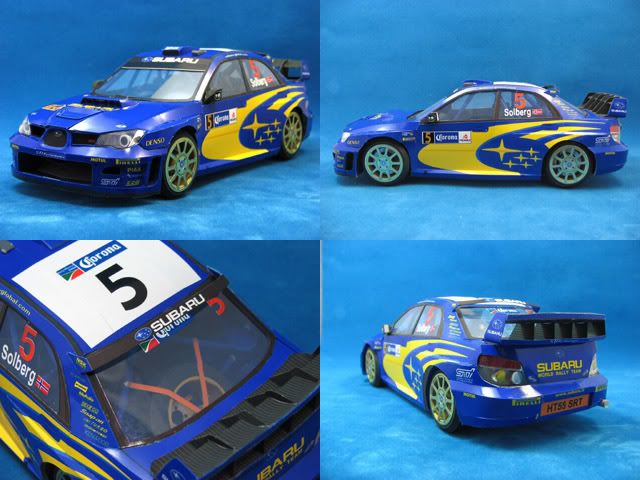
paper models project : subaru wrc 2006 photos

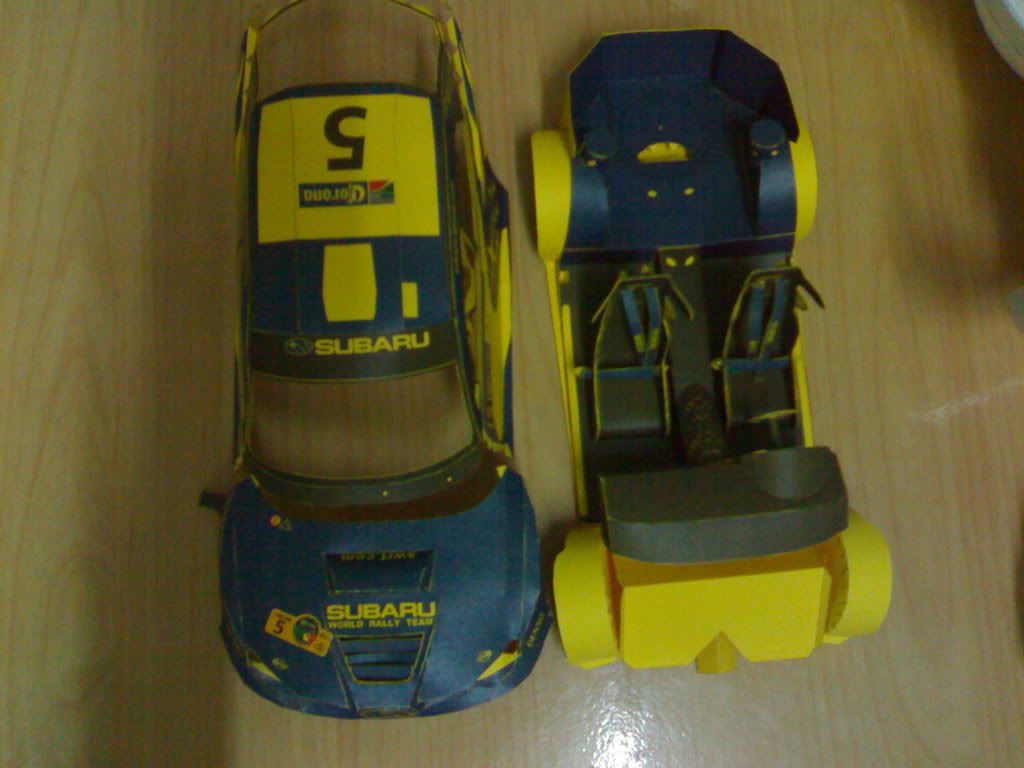
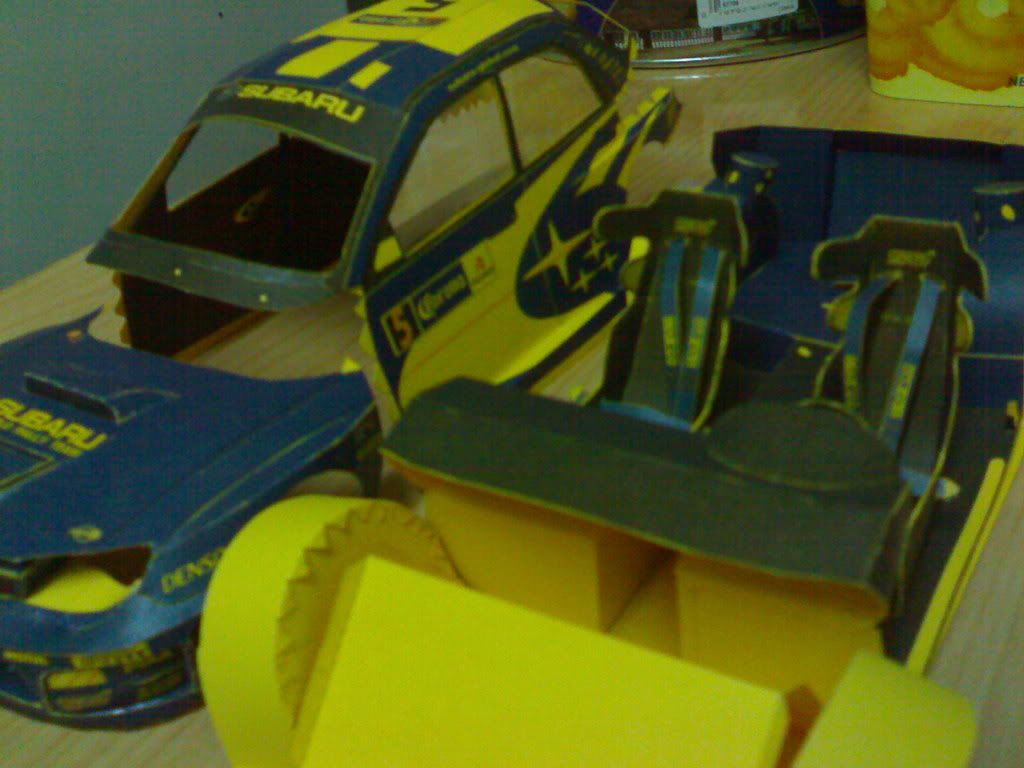
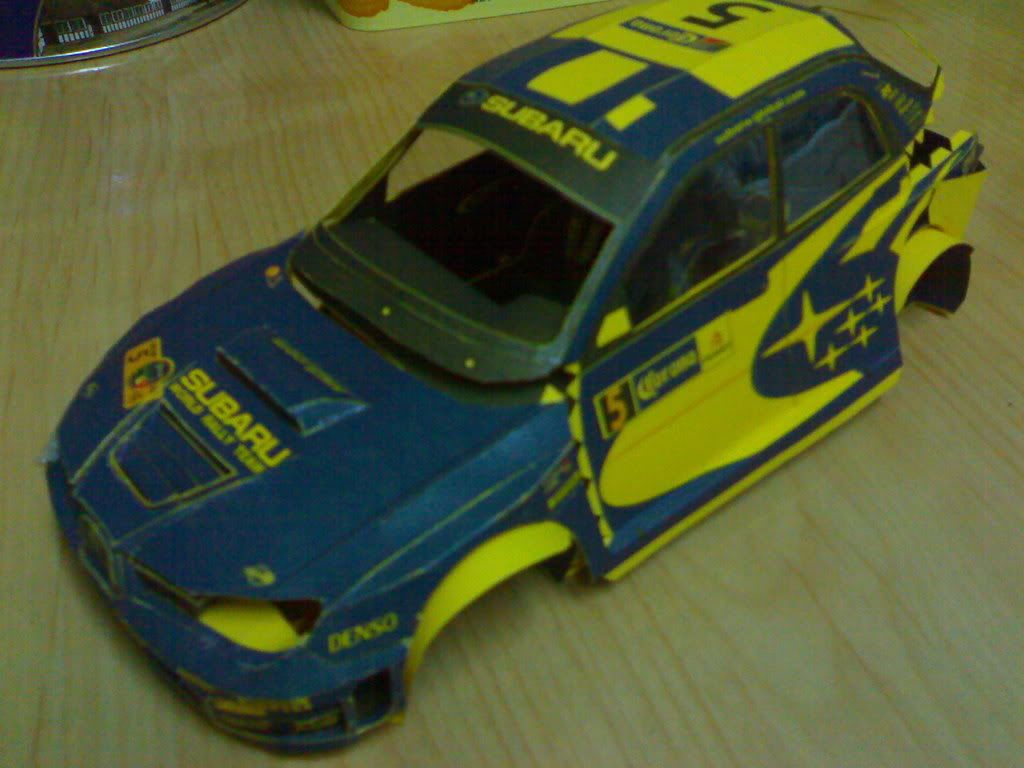
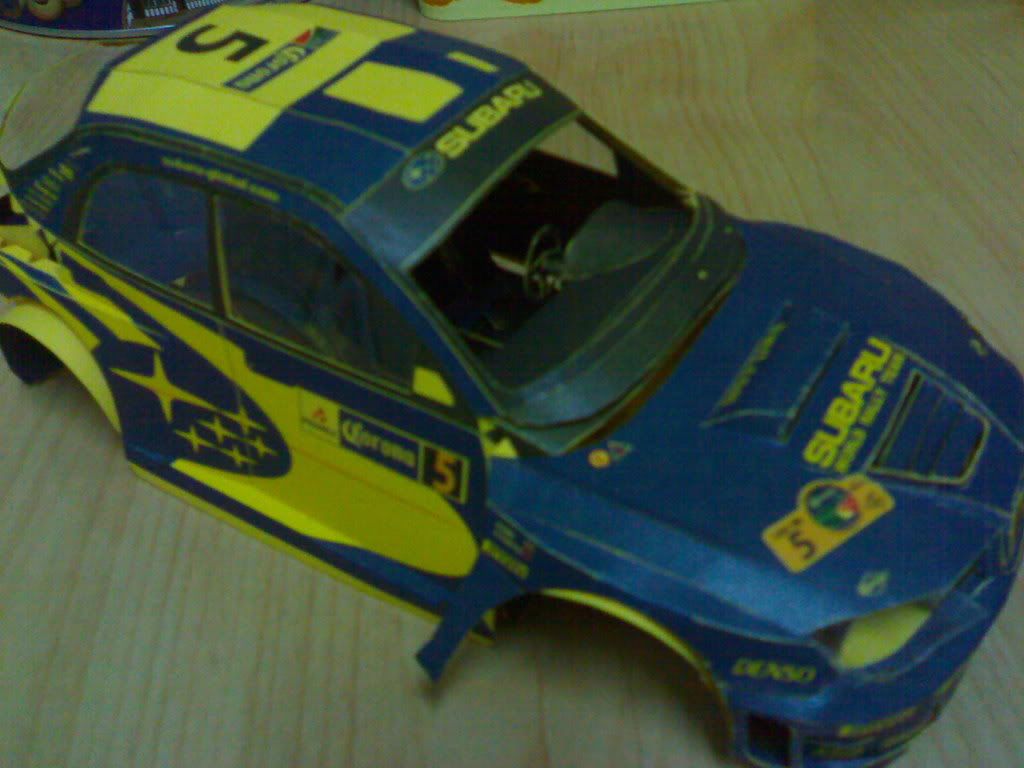
as promised..here's some pictures i've taken of my still unfinished subaru impreza paper model or cut-outs.

top view of front grill, hood, car cover and interior. btw, i used yellow A4 paper just in case your wondering why the "5" background is in yellow.


front right corner view. you can see the seat belts/harness..


bolted in..missing tires, back bumpers, windshield, wipers (yes it has this tiny wipers, i'll connect it later for the final touches), side mirrors and headlights assembly


i'm still having a hard time figuring out how to attach the headlight assembly.


i'll post more pics of my progress later. ciao.

Tuesday, January 22, 2008

paper models fold techniques

follow-up on paper models, paper crafts, paper cut-outs

i am such a noob. not that i'm complaining but i've spent more than 12 hours on the wrc 2006 front grill alone. that's because i don't know the difference between the two basic folds! not that it's my fault, can't read hiragana or kanji plus the pdf pattern has the japanese characters embedded on it, reason why i can't select-copy the words and have it translated. here's the legend:


after hours of googling i finally found the meaning of 谷折り which means "valley fold" by translate.google or "valley snapping" by babelfish (what the heck is snapping anyway??) finally i decided, googles' translation is better.

now i'm left with 山折り to translate.. if means "valley" and 折り means "fold" (just guessing) what's the antonym or reverse of "valley"? so i translated the words "hill" and "mountain". "hill" is and "mountain" is . am i genius or what?? haha!!

japanese to english:
谷折り - valley fold
山折り - mountain fold

searching again, i found out about the basic folds in Origami. cool. now i can fold those mind boggling/puzzling cut-outs again.

Friday, January 18, 2008

paper models/crafts/cut outs

i'd like to share my latest hobby -- paper crafts/paper models/paper cut-outs.

must haves (required):
+ scissors
+ paper or box cutters
+ glue - elmers glue is ok
+ printer
+ ruler
+ empty ballpen - used for making neat folds..run the empty ballpen thru a fold mark for easy folding (nice trick btw)
+ paper (light to heavy type) - if you like japanese cutouts (like me) better buy A4 standard size since most patterns are in A4. word of advice -- make sure when printing the patterns not to use the "fit to margins" settings or anything similar, use "none" instead to print the actual pattern size.

optional:
+ air brush - haven't done any project yet with paint since i always print in color
+ paint brush
+ glue gun
+ thin double sided tapes
+ paper clips - used for holding two edges together
+ markers
+ sticker paper - used for printing sticker cutouts i.e. car stickers/vinyls

here are some links i came across while "googling" to get me started. they are absolutely free so feel free to download and print.

for beginners:
+ i like subaru

5/10 difficulty (7/10 for beginners like me):
+ more impreza, f15 etc..

latest project of mine is the impreza 2006. see photo below:


others, with varying degree of difficulty:
+ yamaha TMAX - comes with english instructions, separate color and white versions.
+ check out this taiwanese 3D paper model site. they have a wide range of categories i.e. robots, weapons to furnitures.

enjoy! i'll post pics later - excited with my subaru impreza ;)


© New Blogger Templates | Webtalks